A Guide To SEO Web Page Design That Actually Gets Results
Let’s be honest for a moment. You’ve poured countless hours, your passion, and a good chunk of money into your business website. It’s got a sharp design, your logo is front and centre, and it lists all your services perfectly.
So… why isn't it pulling its weight? Why aren't the phones ringing or the contact forms getting filled out?
Having a beautiful website that no one can find is like having a stunning storefront hidden down a back alley. It might be the most attractive shop in all of Kelowna, but if potential customers never walk by, its looks don't matter one bit. This is exactly where a thoughtful approach to SEO-friendly web page design makes all the difference.
Your Website Is Your Best Employee, So Put It To Work
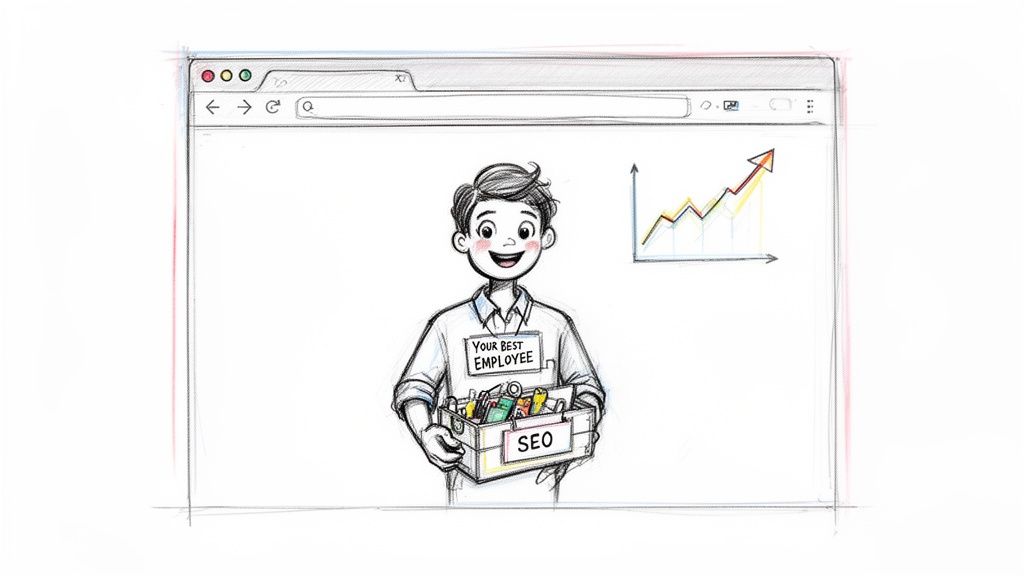
It sounds a bit strange, but think of your website as your most dedicated employee. It works 24/7, never calls in sick, and has the potential to be your number one salesperson. But just like any star employee, it needs the right training and tools to perform at its best. SEO is that training.
SEO web page design is really just about making sure your site does two crucial jobs at the same time: delighting your human visitors and speaking Google's language fluently. A site that’s designed with SEO baked in from the very beginning is engineered for success. It’s all about creating a seamless, enjoyable experience for real people that also happens to tick all the technical boxes for search engines.
Proper SEO gives your website the ability to:
Show up the moment potential customers in the Okanagan are searching for what you offer.
Guide visitors effortlessly to the information they need, preventing frustration.
Load quickly on any device—especially mobile—so people don’t get impatient and leave.
Build trust and establish your business as a credible, professional authority in your field.
The big idea is surprisingly simple. A great user experience is great SEO. When you focus on making your website easy and pleasant for people to use, search engines take notice and reward you for it.
Why This Is Crucial for Your Local Business
Here in the Okanagan, whether you're selling real estate in Penticton or running a tourism business in Vernon, your customers start their journey online. They're on their phones searching for "Okanagan hotels" or "Kelowna real estate agents."
This is why a local focus is so critical. For Canadian businesses, mobile traffic now makes up a massive 61.19% of all web visits. Even more telling, a staggering 88.5% of users will abandon a site if it loads too slowly. Custom, responsive designs built with local search in mind are what actually get seen.
Before we dive into the nitty-gritty, let's look at the foundational elements that turn a simple website into a powerful marketing tool.
Core Pillars Of SEO-Friendly Web Design
Here’s a quick look at the foundational elements that turn a simple website into a powerful marketing tool.
| Pillar | Why It Matters For Your Business | Quick Win |
|---|---|---|
| Technical SEO | The "under-the-hood" stuff that helps Google find and understand your site. Without this, even the best content is invisible. | Run your site through Google's PageSpeed Insights to check your mobile performance score. |
| On-Page SEO | Optimizing individual pages with the right keywords, titles, and content so they rank for specific search queries. | Make sure the title of your homepage clearly states what you do and where you do it (e.g., "Okanagan Valley Wine Tours"). |
| User Experience (UX) | How easy and enjoyable your site is to use. If visitors get frustrated, they leave—and Google notices. | Ask a friend to find your phone number or a specific service on your website. Watch where they struggle. |
| Content Strategy | Creating helpful, relevant content that answers your customers' questions and establishes you as an expert. | Write a blog post answering the most common question you get from new customers. |
Each of these pillars works together to support your online presence. Get them right, and you're well on your way.
Ultimately, SEO-friendly web design is all about giving your "best employee" the tools it needs to connect with your community and grow your business. Over the next few sections, we’ll break down exactly how you can do that, step by step. If it ever feels like a bit much to handle, remember that's what a good partner is for. We’re always here to help you get it right.
Building A Solid Foundation With Smart Site Architecture
Before you even think about picking a colour scheme or a fancy font, we need to talk about your website’s blueprint. This is your site architecture, and honestly, it’s one of the most critical parts of any successful SEO web page design. Get this right, and you're building your house on solid bedrock; get it wrong, and you're building on sand.
Here’s a simple way to look at it: a good site structure is like a well-organized retail store. A customer walks in and instantly knows where to find everything. The aisles are clearly marked, products are grouped logically, and the checkout is easy to spot. A confusing website, on the other hand, is like a cluttered shop where everything is just… everywhere. People get frustrated and walk out.
Google’s search bots feel the same way. When they "crawl" your site, they need to understand how all your pages are connected. A logical structure helps them figure out what your most important pages are and, ultimately, what your business is all about.
Keep It Simple and Intuitive
The main goal here is to make navigation effortless for both people and search engines. You really don’t need dozens of items cluttering up your main menu. In our experience, keeping it simple is almost always more effective.
For most local businesses here in the Okanagan, a straightforward structure works wonders. Let's say you're a real estate agent in Vernon. Your primary navigation could be as simple as this:
Home: The front door to your digital business.
Listings: A direct path to the properties you’re selling.
Neighbourhood Guides: This is where you show off your local expertise (think "Living in Coldstream," or "Why East Hill is Great for Families").
About Us: Share your story, introduce your team, and build that crucial trust.
Contact Us: The page that turns a curious visitor into a real lead.
This kind of clean layout tells visitors exactly where they need to go. It’s predictable and user-friendly, which starts building confidence from the very first click.
A well-planned site architecture is more than just a sitemap. It’s a roadmap for your users and a clear signal to Google about your site's priorities. It works behind the scenes to guide everyone to your most important content, improving their experience and your rankings.
Why Your URLs Matter More Than You Think
Another crucial piece of your site’s foundation is the URL structure. This is the web address for each page, and it’s a golden opportunity for SEO that too many people overlook. You want your URLs to be clean, readable, and descriptive.
Let’s take an example from a West Kelowna winery. Which of these links makes more sense?
yoursite.com/p?id=123_45_vyoursite.com/wines/pinot-noir
It’s the second one, hands down. It’s not just easier for a person to read; it tells Google precisely what the page is about before its bots even look at the content. It contains a relevant keyword ("pinot-noir") and shows the page is neatly filed under a "wines" category.
Nailing these foundational elements from the very beginning will save you from massive headaches later on. It ensures your website is built for growth from day one. If you’re curious how this structure gets communicated to Google, you can check out our guide on creating a sitemap, which is the official roadmap you submit to search engines.
Planning your site architecture might not be the sexiest part of web design, but it is absolutely the backbone of a strong online presence. With a solid plan in place, every other aspect of your SEO web page design has a much greater chance of success.
Getting On-Page SEO Right Without Sounding Robotic
Let's dig into on-page SEO. It might sound like another piece of technical marketing jargon, but it’s really just about making each page on your website as clear and helpful as possible—for both search engines and the people you want to reach.
Think of it as setting up your digital storefront. Every sign, every label, every product description helps customers find exactly what they’re looking for. The small, thoughtful changes you make directly on your pages can have a massive impact on your search rankings.
The golden rule? Write for humans first. When you focus on being genuinely useful and clear, the SEO often takes care of itself.
Your Page Titles and Headings
The first thing to get right is your page title, also known as the title tag. This is the main headline people see in Google search results and what appears in their browser tab. It's your first, best chance to grab their attention and signal that your page has the answer they need.
A strong title is direct, concise, and features the page's main keyword. For a real estate agent in Vernon, a page about waterfront properties shouldn't just be called "Listings." A far better title would be "Vernon Waterfront Homes for Sale | Okanagan Real Estate." It immediately tells searchers what you offer and where.
Next are your headings—the H1s, H2s, and H3s that organize the content on the page, just like the ones in this guide. Headings act like signposts, breaking up text into scannable sections. This not only guides your readers through the page but also helps search engines understand the structure and hierarchy of your information.
Good on-page SEO is a lot like good storytelling. Your title is the intriguing book cover, your headings are the chapter names, and your content is the compelling story that keeps people hooked. It all has to work together.
Writing Content That Actually Connects
Now, let's talk about the heart of your page: the content itself. A common myth is that SEO writing means awkwardly stuffing keywords into every other sentence. That’s a surefire way to make your copy sound robotic and drive potential customers away.
The real goal is to write naturally and comprehensively about your topic. If you run a tourism business in Penticton offering wine tours, you'll naturally use phrases like “Okanagan wine tasting,” “Naramata Bench wineries,” and “vineyard tour packages.” You're simply using the language your customers use when they're looking for you.
Your content should be built to answer questions, solve problems, and showcase your expertise. We go into much more detail on this in our guide on how to write marketing copy for real people. It’s all about forging a genuine connection.
Here are a few simple tips to make your content work harder:
Anticipate questions: What do your customers ask all the time? Create content that answers those questions head-on.
Keep it scannable: Short sentences and brief paragraphs are much easier to read, especially on a phone.
Use lists: Bullet points and numbered lists (like this one!) are perfect for breaking up dense text and making information easier to digest.
Don’t Forget Your Images
Every single image on your website is another opportunity to strengthen your on-page SEO. Search engines can’t "see" a photo of a beautiful Okanagan landscape the way we can, so we need to give them some context with alt text.
Alt text (or alternative text) is a short, descriptive sentence that explains what an image is about. Its main purpose is accessibility—it allows screen readers to describe images to visually impaired users. As a bonus, it also tells Google exactly what the image shows, adding valuable relevance to your page.
So, before you upload that photo from your latest project, change the generic filename from IMG_1234.jpg to something descriptive like kelowna-custom-home-exterior.jpg.
Then, your alt text could be: "Modern custom home with lake views in Kelowna, BC."
It’s a quick, simple step that makes your site more accessible and gives your SEO a nice little nudge in the right direction. By focusing on these on-page fundamentals, you’re not just optimizing for Google; you’re creating a better, more helpful experience for everyone who visits your site.
The Unseen Heroes Of Technical SEO

Let's pull back the curtain and talk about what happens behind the scenes. This is the technical side of SEO, and while it might sound a bit intimidating, you absolutely don’t need to be a developer to get a handle on the fundamentals.
Think of these technical elements as the unsung heroes of a great SEO web page design. They’re the foundation everything else is built on. If that foundation is shaky, it doesn't matter how beautiful the rest of the house looks.
The Need For Speed
The biggest factor in the technical SEO game is, without question, site speed. We’ve all been there—you click a link, and then you wait… and wait. What do you do? You hit the back button.
Your customers do the exact same thing. If your site takes forever to load, people will bounce before they even see what you have to offer. Google knows this, so it gives a clear advantage to faster websites in its search results. It’s a direct reflection of the user experience you're providing.
What typically slows a website down? A few common culprits are:
Massive image files: This is the number one issue we see. High-resolution photos are gorgeous, but they need to be properly compressed for the web.
Clunky code: Bloated or outdated code can seriously drag down your loading times.
Cheap hosting: Your hosting plan is the plot of land your website is built on. A slow, overcrowded server will always lead to a slow site.
We run into these issues constantly when helping Okanagan businesses get their sites into shape. One of the first things we tackle is image optimization. If you want a head start, our guide on reducing image file size is a great place to begin.
Your Website Must Work On A Phone
Another huge piece of the puzzle is how your website performs on a mobile device. Just think about your own habits. People are browsing on their phones while waiting for coffee in downtown Kelowna or looking up wineries on a whim in Penticton.
Your site absolutely has to look and work great on a small screen. This is what we call mobile-friendliness or responsive design, where the layout automatically adjusts to fit whatever screen it's on. Buttons should be easy to tap, text should be readable without zooming, and navigation has to be simple.
Think of it this way: your mobile site isn't just a smaller version of your main website anymore. For a huge chunk of your audience, your mobile site is your main website.
Unlocking The Doors For Google
Finally, let's briefly touch on two concepts that sound complex but are actually quite simple: crawlability and indexability.
Imagine your website is a brand-new shop.
Crawlability is about making sure Google's bots can find the front door and easily walk down every aisle. If a page is "uncrawlable," it's like a locked room the bots can't get into.
Indexability is about giving Google permission to add what it finds in your shop to its massive catalogue (the search index). If a page isn't "indexable," it's like putting a sign on the door saying, "Don't list this section in your directory."
For the most part, you want every important page on your site to be both crawlable and indexable. It’s the digital equivalent of ensuring all the doors to your business are unlocked so Google can come in, have a good look around, and confidently tell its users what you have to offer.
To help you get started, here's a quick checklist of the technical basics to keep an eye on.
Simple Technical SEO Checklist For Your Business Website
Focus on these key areas to improve your site's health and performance without getting lost in technical jargon.
| Checklist Item | What It Means | Why Google Cares |
|---|---|---|
| Mobile-Friendly Design | Your site looks and works great on phones and tablets without pinching or zooming. | Over 60% of searches happen on mobile. Google prioritizes mobile-first experiences. |
| Fast Page Load Speed | Key pages load in under 3 seconds. Check with PageSpeed Insights. | Slow sites frustrate users. Speed is a confirmed ranking factor. |
| Secure with HTTPS | Your site URL starts with https://, not http://. A lock icon appears in the browser. |
Google wants a secure web. It’s a small but important trust and ranking signal. |
| Clean URL Structure | URLs are simple, descriptive, and easy to read (e.g., /services/web-design). |
Simple URLs are easier for both users and search engines to understand. |
| No Broken Links (404s) | All internal and external links on your site lead to a live page. | Broken links create a dead-end for users and search bots, harming the experience. |
| XML Sitemap | You have a file that lists all your important pages, like a roadmap for Google. | Helps Google find and crawl all your content efficiently, especially on larger sites. |
Getting these basics right is a huge step forward. When these technical heroes work together, they create a seamless, fast, and accessible experience that makes all your other SEO efforts that much more effective.
Designing for People First (And Why Google Loves It)

Here’s a little secret that completely changes the game for SEO web page design: Google’s main goal is to make its users happy. It wants to serve up the best, most relevant answers to their questions, every single time.
So, if you create a website that people genuinely love to use, Google will love it, too. This is where two critical ideas come into play: User Experience (UX) and Accessibility.
What Is User Experience and Why Does It Matter?
User Experience, or UX, is all about how a person feels when they're interacting with your site. Are they finding what they need without any friction? Or are they clicking around in circles, getting annoyed, and eventually hitting the back button?
A great UX is intuitive. It’s when a visitor doesn’t have to think too hard about what to do next. It just… makes sense.
For example, on a mobile phone, are the buttons big enough for a thumb to easily tap? Is the text on the page clear and easy to read without having to pinch and zoom? Does your contact form actually work without any weird glitches?
These details might seem small, but they add up to a massive impression. When we work with clients here in the Okanagan, a huge part of our process is walking through their website from a customer's point of view to smooth out all those little bumps that cause frustration.
Making Your Website Accessible to Everyone
Going hand-in-hand with UX is accessibility. This simply means making sure that your website can be used by everyone, including people with disabilities. A website that’s accessible is a website that’s open for business to the entire community.
Accessibility involves practical design choices, like:
Good colour contrast: Ensuring text is clearly legible against its background, which is a huge help for users with visual impairments.
Keyboard navigation: Making it possible to move through your entire site using only a keyboard—essential for people who can't use a mouse.
Descriptive alt text for images: As we mentioned earlier, this helps screen readers describe visuals to those who can't see them.
When you design for accessibility, you’re not just checking a box. You're creating a better, more inclusive experience that benefits every single person who visits your site. It’s good for people, and it's good for business.
A Practical Example From The Okanagan
Let’s make this real. Imagine you run a tourism business in West Kelowna. A potential customer lands on your homepage, excited to book a wine tour. What do they see?
A vague button that just says "Learn More" can be confusing. It creates an extra step and adds a moment of uncertainty. A visitor has to wonder, "Learn more what?"
A much better approach is a clear, compelling Call-to-Action (CTA) button. A bright, unmissable button with text that says “Book Your Wine Tour Now” leaves absolutely no doubt. It tells the user exactly what will happen when they click, guiding them smoothly toward becoming a customer.
This kind of thoughtful design makes a huge difference in user happiness and, ultimately, your bottom line. It’s also becoming a key factor for Canadian consumers. The 2026 Canadian Web Design Forecast found that a huge 73% of Canadian consumers now prefer brands that show environmental responsibility online. In fact, sustainably designed websites often see a 15-20% boost in their performance scores, which directly helps search rankings. You can read more about these Canadian web design trends to see where things are headed.
By prioritizing the people who use your website, you're building a stronger, more effective online presence that both your customers and Google will reward. If you're not sure where to start, getting an expert partner to take a look under the hood can reveal opportunities you might have missed.
Weaving Your Content Together with Internal Links
Your website should be more than just a collection of disconnected pages. Think of it as a web of interconnected ideas, where every piece of content supports the others. Your service pages are the pillars, sure, but the real magic happens when you connect them with valuable, supporting content. Internal links are the threads that tie everything together, creating a strong, cohesive structure that both users and Google love.
This is why creating genuinely helpful content is so critical. Writing blog posts, in-depth guides, or even client case studies isn't just about showing off; it's about building authority and answering the real questions your customers have.
A Practical Okanagan Example
Let's say you're a custom home builder in Kelowna. A common headache for your clients is picking materials that can handle our region's unique climate—scorching summers and heavy snow. Seeing this need, you write a detailed blog post: "Choosing the Best Building Materials for the Kelowna Climate."
In this article, you pour out your expertise. You discuss the pros and cons of different siding options, explain the value of energy-efficient windows, and recommend the best wood for a deck that won't buckle under the Okanagan sun. You've now created a fantastic, practical resource that people are actively searching for.
So, how do we make this work for your SEO?
Making the Strategic Connection
This is where you connect the dots. As you're writing that helpful article, you can sprinkle in links back to your core services in a way that feels completely natural.
When you mention energy-efficient windows, link that phrase directly to your "Window Installation" service page.
When you talk about decking materials, link out to your "Custom Decks & Patios" page.
This simple strategy accomplishes two huge goals at once. First, it guides an interested reader from a general topic directly to a specific service you offer, moving them closer to becoming a client. Second, it sends a powerful signal to Google that your main service pages are authoritative and important.
These connections, known as internal links, are one of the most underrated but effective parts of a solid SEO web page design. You're essentially telling search engines, “Look at all this expert content I've created—it all points back to this core service page, which means that page must be a pretty big deal.”
This creates a powerful web of relevance that helps users and search engines understand the full scope of your expertise. It transforms a casual blog reader into a potential lead by seamlessly showing them that you don't just provide advice; you provide the solution. Building out a content strategy like this can feel like a lot, but that's what a good partner is for. We can help you map out a plan that gets results.
Your SEO Web Design Questions, Answered
Let's be honest, the intersection of web design and SEO can feel a bit like learning a new language. Over the years, we've had countless conversations with business owners, and a few key questions always come up.
So, let's clear the air and tackle them head-on.
How Long Until I See SEO Results From My New Web Design?
This is easily the most common question we get, and the honest answer is: it’s a long game. SEO isn't a light switch you can just flip on.
While fixing major technical issues can sometimes give you a noticeable boost in a few weeks, building the kind of authority that ranks for valuable, competitive keywords typically takes 4 to 12 months of consistent effort. Think of it like a garden; you prepare the soil, plant the seeds, and nurture them over time before you see the real growth.
Should I Do SEO On My Existing Website or Start Fresh With A New One?
The answer really hinges on the state of your current site's foundation.
If your website is built on a modern platform (like WordPress), is already mobile-friendly, and has a decent structure, we can often achieve fantastic results by optimizing what you already have. There's no need to reinvent the wheel if the core is solid.
However, if your site is slow, built on outdated tech, or a nightmare to update, it's probably holding your business back. In those cases, a redesign is the most sensible and cost-effective path forward in the long run. We always start with a thorough audit of your site's performance to give you a clear, honest recommendation.
A beautiful website that nobody can find is just an online brochure. A website that ranks #1 but frustrates users won't convert them into customers. You absolutely need both.
This is where great SEO web page design comes in. It’s the art and science of ensuring people can find you and have a fantastic experience when they do—one that convinces them you're the right choice.
If your website feels more like a liability than an asset, let's change that. The team at Navigator Multimedia can help you turn it into a lead-generating machine. Let's talk about your project.